Why Precise Documentation Matters
Accurate, contemporaneous records are the backbone of any successful claim. Courts and insurers scrutinize every detail, so a well‑organized file can mean the difference between full benefits and a denied case. Precise documentation links the injury to workplace duties, satisfies statutory reporting deadlines, and provides the factual foundation for workers’ compensation and personal‑injury lawsuits. Medical experts and independent consultants rely on clear, complete evidence—photos, witness statements, audiograms, and treatment notes—to evaluate causation, severity, and lasting impairment. Their expert opinions, built on solid documentation, carry far more weight with adjusters and judges, dramatically improving the odds of a favorable outcome.
Immediate Response and Personal Injury Logging
| Action | Details | Deadline / Notes |
|---|---|---|
| Seek medical care | Obtain treatment, inform provider injury injury is work‑related, keep copies of notes, prescriptions, tests | Within 24–48 hours of injury |
| Notify employer | Report to supervisor/HR in writing (email or letter) | Immediately, ideally same day |
| OSHA Form 300/301 | Ensure employer completes official incident report | Within 7 days of discovery |
| Gather evidence | Witness names, dated photos/videos of scene, injuries, hazards; preserve physical evidence | As soon as possible |
| Personal injury diary | Daily log of pain levels, functional limits, treatments, missed work, expenses | Ongoing, update each day |
| Preserve communications | Save emails, texts, receipts chronologically; back up electronically | Ongoing |
| Create narrative | Answer the six Ws (who, what, when, where, why, how) in a detailed written account | Within 48 hours |
| Secure employer’s incident report | Obtain copy for your records | Immediately after reporting |
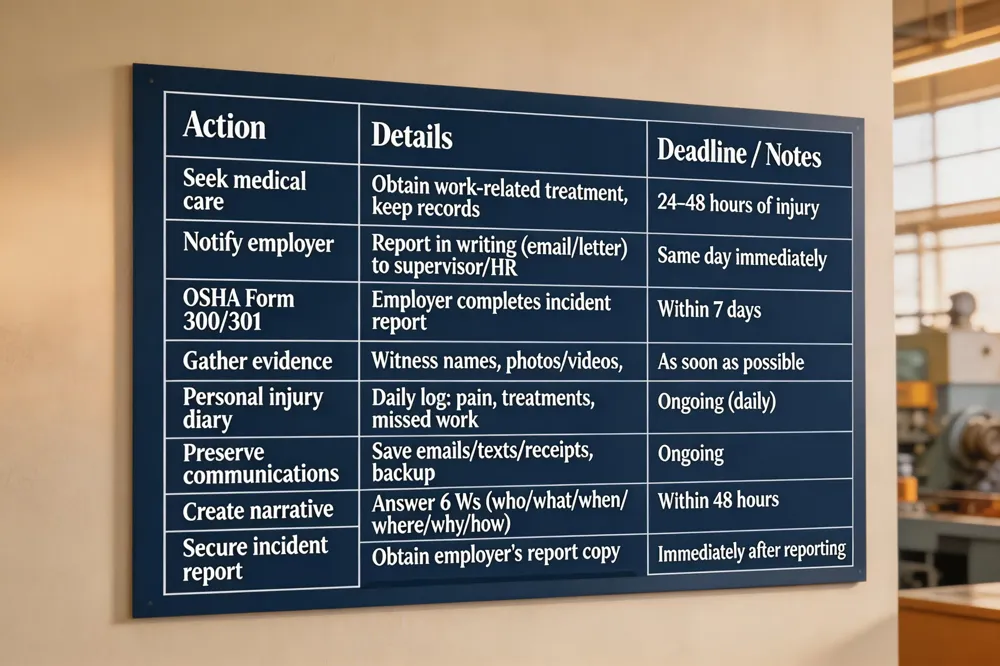
Incident reporting procedures: Notify your supervisor or HR immediately—ideally in writing—so that an official OSHA Form 300/301 (or state equivalent) can be completed. Gather witness names, take dated photos or videos of the scene, injuries, and any hazardous conditions, and preserve physical evidence. Secure a copy of the employer’s incident report for your records.
Creating a personal injury diary: Record daily pain levels, functional limits, treatments, and missed work. Include dates, times, and descriptions of symptoms, and log all related expenses (medical bills, transportation, lost wages). Store emails, texts, and receipts chronologically, and back up electronically.
How should I document a workplace incident? Secure the area, interview witnesses, capture dated visual evidence, write a detailed narrative answering the six Ws, complete OSHA forms within mandated time frames, and retain copies.
What happens if I injure myself at work? Get immediate medical care, report the accident promptly, gather evidence, and pursue workers’ compensation benefits for medical costs and lost wages.
How do I document my injuries after an accident? Obtain a medical evaluation, photograph injuries regularly, keep a daily symptom journal, retain all medical records and expense receipts, and share the file with an experienced workers’ compensation attorney.
Gathering the Evidence Needed for a Strong Claim
| Evidence Type | Description | Tips |
|---|---|---|
| Medical documentation | Hospital records, physician notes, specialist reports, treatment invoices | Keep originals and digital copies; request full records |
| Visual evidence | Photos/videos of injury site, damaged equipment, visible injuries (e.g., hearing‑protection gear) | Date‑stamp files; store in secure folder |
| Witness statements | Written accounts from coworkers, supervisors, by‑standers with contact info | Obtain signatures; include date and location |
| Employer’s incident report | OSHA Form 301, safety logs, internal reports | Request copy from HR; keep for reference |
| Police/fire reports | If applicable, official reports from authorities | Obtain via public records request |
| Expense receipts | Out‑of‑pocket costs: medication, hearing aids, travel, lost wages | Organize chronologically; total amounts for claim |
| Expert reports | Audiology, occupational health, ergonomic assessments | Engage early; attach to claim packet |
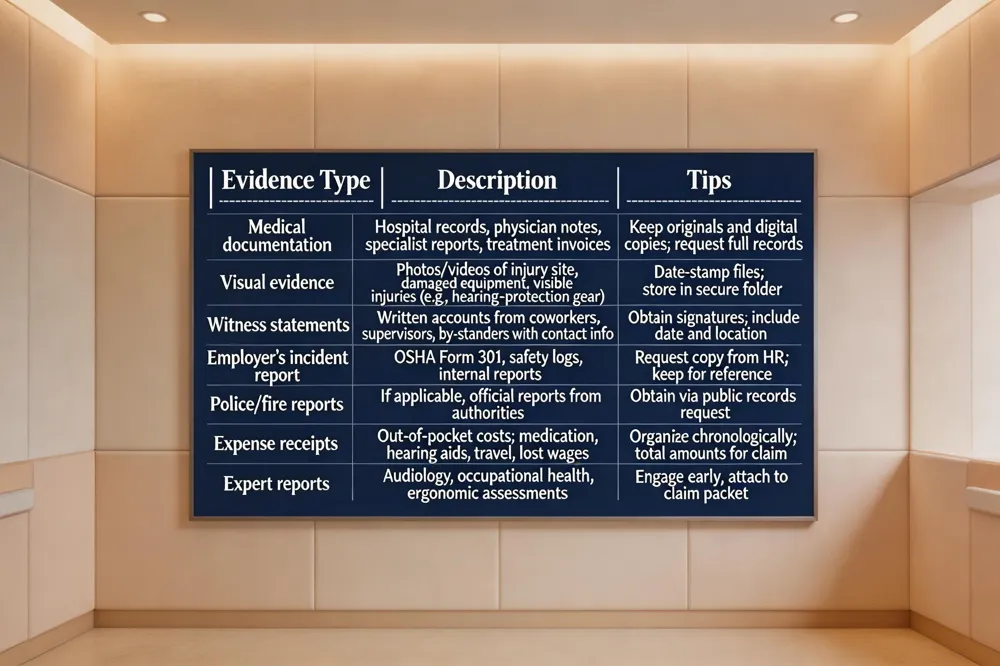 A solid workers’ compensation claim hinges on thorough, organized evidence.
What evidence do I need for an injury claim? Collect complete medical documentation—hospital records, physician and specialist notes, audiology reports, and all treatment invoices. Preserve photographic or video evidence of the injury site, damaged equipment, and any visible signs of the injury (e.g., hearing‑protection gear). Obtain written statements from coworkers, supervisors, or other witnesses who saw the incident, and retain the employer’s official incident report, safety logs, and any police or fire‑department reports. Finally, keep receipts for out‑of‑pocket costs such as medication, hearing aids, travel to appointments, and documented lost wages.
How do I write a work injury statement? Start with the exact date, time, and location of the incident. Describe the event chronologically, naming all parties involved and their roles. Detail the injuries, symptoms, and medical treatment received, then explain the impact on your ability to work, any time off taken, and ongoing limitations. Conclude with a brief summary, sign and date the statement, and attach supporting documents (medical reports, photos, witness statements).
What is an OSHA Incident Report Form? OSHA Form 301, the “Injury and Illness Incident Report,” records every work‑related injury that meets OSHA’s criteria. It captures employee data, incident details, body part affected, activity, equipment, substances involved, and medical treatment. Employers must complete it within seven days of learning of the incident and retain it for five years.
Is there an Excel template for the OSHA 300 Log? Yes. OSHA provides an Excel version of Form 300 (and Form 301/300‑A) on its website, meeting the formatting rules of 29 CFR 1904.29(b)(4). This spreadsheet simplifies data entry for employers who prefer a digital workflow.
Is it possible to get a fillable OSHA Form 300? A fillable PDF of Form 300 is available for download from OSHA. It can be completed electronically, saved, and printed. While the PDF is for internal use, the official submission must be made through OSHA’s Injury Tracking Application.
OSHA Record‑Keeping Requirements and How to Use Them
| Requirement | Description | Retention Period |
|---|---|---|
| Form 300 (Log) | Records every recordable injury/illness (date, location, activity, body part, equipment, treatment) | Keep on‑site for 5 years |
| Form 301 (Incident Report) | Detailed incident data completed within 7 days of discovery | Keep with Log for 5 years |
| Form 300A (Annual Summary) | Aggregates year‑end totals; posted Feb 1–Apr 30 | Retain for 5 years |
| Posting summary | Display 300A in a conspicuous place for employees | Must be posted each year |
| Employee access | Provide records to current/former employees, representatives, OSHA inspectors upon request | Ongoing during retention period |
| Digital logs | Excel template for 300/300A or fillable PDF | Ensure formatting complies with 29 CFR 1904.29(b)(4) |
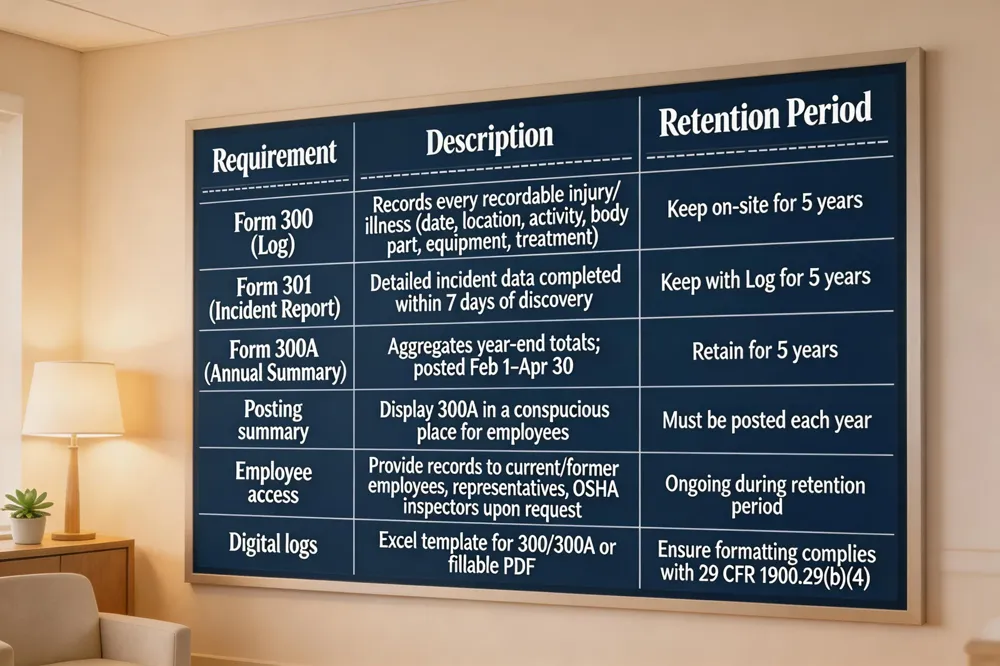 OSHA’s record‑keeping system is built around Form 300 (the Log of Work‑Related Injuries and Illnesses) and its annual summary, Form 300A. The primary purpose of Form 300 is to capture every recordable incident—fatalities, loss of consciousness, days away from work, restricted work, job transfer, or medical treatment beyond first aid—by noting the date, location, employee activity, body part affected, and equipment or substances involved. This detailed log enables employers, insurers, and attorneys to identify safety trends and substantiate workers’ compensation or litigation claims.
Form 300A aggregates the year‑end totals from the Log, including the number of deaths, cases with days away, and total lost days, and must be posted in a conspicuous place from February 1 through April 30. Posting the summary promotes transparency and provides employees and regulators with a snapshot of workplace safety.
Recordable criteria are defined by OSHA and include any work‑related injury or illness that results in death, days away from work, restricted activity, job transfer, or medical treatment beyond first aid. Employers with ten or more employees (or those in partially exempt industries) must retain the Log, the Form 301 incident reports, and the 300A summary for at least five years and make them available to current and former employees, their representatives, and OSHA inspectors upon request.
What is OSHA Form 300 used for? It is the official log that documents every recordable workplace injury or illness, allowing employers to track safety trends and providing essential evidence for workers’ compensation and legal claims.
What is the OSHA Form 300A summary? It is the annual summary of total recordable incidents, posted for employee viewing to ensure transparency.
Where can I find a PDF of OSHA Form 300A? Download it from OSHA’s Recordkeeping Forms page at https://www.osha.gov/sites/default/files/OSHA-RK-Forms-Package.pdf.
What are the OSHA 300 Log requirements? Keep the log on‑site for five years, post the 300A summary, and retain all related documentation for employee access and OSHA inspection.
What is an OSHA Incident Report Form? Form 301 captures detailed incident data within seven days of discovery and feeds into the Log and summary, supporting compliance and claim documentation.
Filing Workers’ Compensation Claims Across States
| State | Notice Deadline | Form(s) | Filing Method |
|---|---|---|---|
| Ohio | 30 days (notice) – up to 1 year to file claim | Form 410 (First Report of Injury) | Mail, hand‑delivery, BWC online portal |
| New Jersey | 14 days (notice) | Form WC‑2 (or employer’s Form 1A‑1) | Employer forwards to insurer or NJ Dept. of Labor |
| Virginia | 30 days (notice) | Form 1‑1 (First Report of Injury) | VWC WebFile portal, fax, mail, in‑person |
| California | 30 days (notice) | Form DWC‑1 (e‑Workers’ Compensation) | eFile portal (online) |
| South Carolina | 90 days (notice) | State‑specific claim form | Submit to SC Workers’ Compensation Commission |
| Other states | Varies (typically 30 days) | State‑specific first‑report form | Usually online, mail, or in‑person |
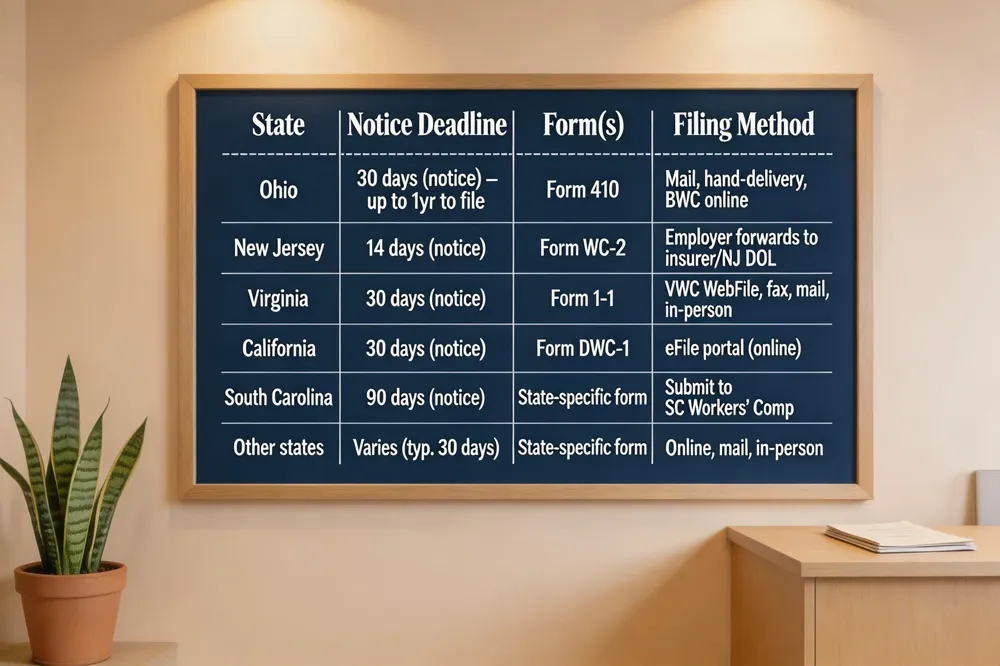 Documenting a work‑related injury promptly is the foundation of a successful workers’ compensation claim. Most states require a written notice within a statutory window—30 days in Ohio and Virginia, 14 days in New Jersey, and 90 days in South Carolina—so the employer can start the reporting process and preserve the employee’s right to benefits.
Ohio – Notify your employer within 30 days, then submit Form 410 (First Report of Injury) either by mail, hand‑delivery, or through the Ohio Bureau of Workers’ Compensation (BWC) online portal. The BWC assigns a claim number and must investigate within 28 days; you have up to one year (two for occupational disease) to file the notice.
Online filing – After the employer’s written notice, many states offer e‑filing. For example, California’s Division of Workers’ Compensation uses the e‑Workers’ Compensation portal (eFile) where you complete Form DWC‑1, upload medical records, wage statements, and receive a confirmation number to track the claim.
New Jersey – Report the injury within 14 days, then complete Form WC‑2 (or the employer’s Form 1A‑1) and have the employer forward it to their insurer or the NJ Department of Labor. If the insurer does not respond, you may file a formal claim petition within two years.
Virginia – Submit Form 1‑1 (First Report of Injury) within 30 days of the incident or diagnosis. The claim can be filed via the VWC WebFile portal, fax, mail, or in person. The Commission issues a Jurisdiction Claim Number and PIN for online access; filing must occur within two years.
A workplace injury qualifies when it arises out of and in the course of employment, covering physical accidents, repetitive‑stress strains, auditory loss, and occupational diseases linked to workplace exposure. Accurate, contemporaneous records—photos, witness statements, medical reports, and expense logs—are essential for both the workers’ compensation system and any potential third‑party litigation. Consulting an experienced workers’ compensation attorney early can ensure deadlines are met, forms are completed correctly, and evidence is preserved for the strongest possible claim.
Avoiding Common Pitfalls and Protecting Your Rights
| Pitfall | Consequence | Prevention |
|---|---|---|
| Inconsistent statements | Reduced credibility, claim denial | Keep a written record; consult attorney before speaking |
| Missing medical appointments | Loss of benefits, weakened claim | Schedule & attend all follow‑ups; keep proof of attendance |
| Social‑media posts about injury | Evidence used against you | Avoid discussing injury details publicly |
| Signing documents without counsel | Unintended waivers of rights | Review all paperwork with an attorney first |
| Delayed filing | Statute of limitations expires, claim barred | Note state deadline; file notice within required period |
| Failure to verify employer’s insurance | Uncertainty of coverage, delayed benefits | Request certificate of insurance; use state verification portals |
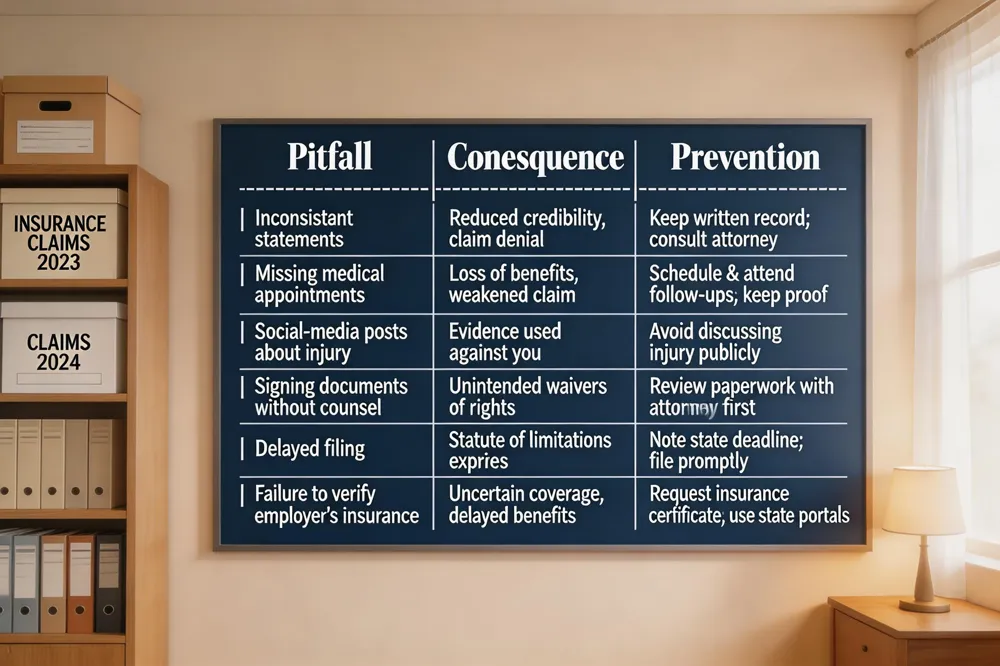 Common claim mistakes include giving inconsistent statements to insurers, missing medical appointments, posting injury details on social media, signing documents without counsel, and delaying filing past statutory deadlines. These errors can undermine the credibility of a claim and reduce recoverable benefits.
It is not "bad" to file a workers’ compensation claim; it is a legal right that secures medical care and wage replacement. Prompt reporting—often within 24‑48 hours and certainly before any state‑mandated deadline—protects your benefits and prevents employer retaliation.
When speaking about an injury, never admit fault, downplay pain, speculate on causes, or discuss medical specifics without an attorney present.
To verify an employer’s workers’ compensation insurance, request the coverage certificate, use the state’s online verification portal (e.g., California DIR, NCCI Proof‑of‑Coverage, or New York Board website), or consult the self‑insured employer registry if applicable.
Employers file a claim by completing the appropriate first‑report form (e.g., California Form 410) within the required timeframe, submitting it to the insurer or state board, and retaining copies for records.
Maximizing a personal injury claim involves gathering contemporaneous medical records, detailed expense logs, wage‑loss documentation, and engaging expert witnesses such as audiologists or occupational health specialists to translate technical findings into persuasive testimony. Organizing these materials into a clear, chronological packet early in the process strengthens negotiations and helps secure full compensation.
Putting It All Together: A Checklist for Claim Success
| Step | Action | Details |
|---|---|---|
| 1 | Write work‑injury statement | Include date, time, location, activity, witnesses, injuries, treatment |
| 2 | Capture visual evidence | Dated photos/videos of scene, equipment, injuries |
| 3 | Obtain witness statements | Written, signed, with contact info |
| 4 | Secure employer’s incident report & OSHA Form 301 | Keep copies for your file |
| 5 | Collect medical records & bills | Include all invoices, prescriptions, treatment summaries |
| 6 | Maintain pain & work‑loss log | Daily entries with intensity, functional limits, missed work |
| 7 | Meet statutory deadlines | Notify employer, file claim within state‑specific window |
| 8 | Retain OSHA logs | Keep Form 300/301/300A for at least five years |
| 9 | Involve experts when needed | Audiologists, occupational health, ergonomic specialists |
| 10 | Consult experienced attorney early | Ensure forms are correct, evidence preserved, rights protected |
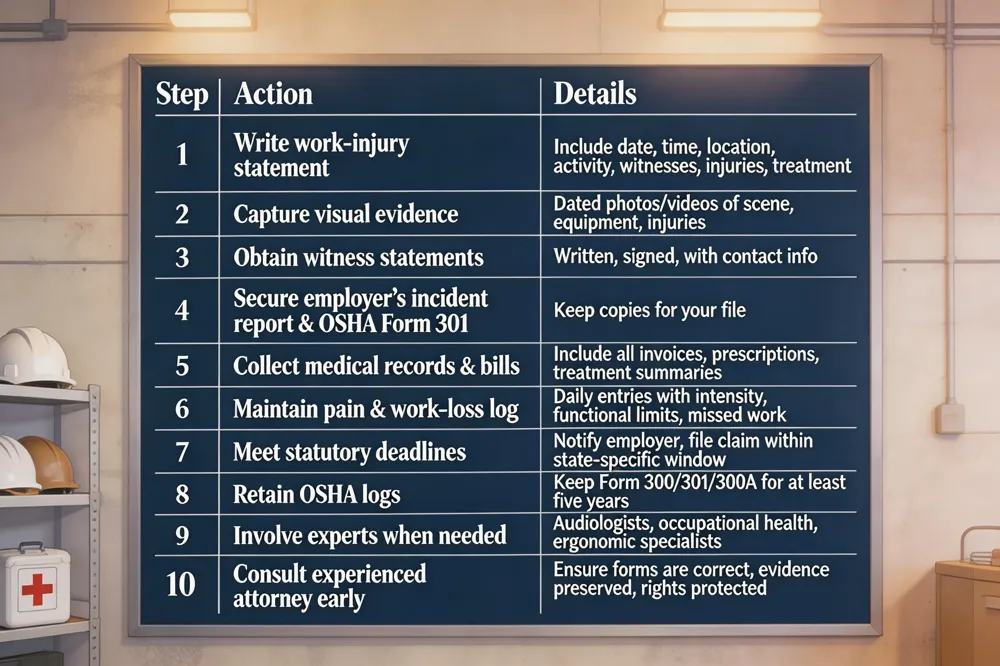 Step‑by‑step checklist: (1) Immediately write a work‑injury statement with date, time, location, activities, witnesses, injuries and treatment. (2) Take dated photos/video of the scene, equipment and visible injuries. (3) Get written witness statements with contact info. (4) Secure employer’s incident report and Form 301. (5) Collect all medical records, bills and receipts for out‑of‑pocket costs. (6) Keep a pain and work‑loss log. Timing and deadlines: notify employer within statutory period (e.g., 30 days, 90 days in SC), file claim (Form 50, Form 410) within state’s filing window, and retain OSHA logs for five years. Involve legal and medical experts when injury is serious, claim is denied, or expert testimony (e.g., audiology) needed.
Putting Documentation to Work
Keeping a complete, chronological file of injury‑related documents—photos, witness statements, medical records, expense receipts, and employer reports—creates the factual backbone insurers rely on. Consistent, detailed records make it harder for an adjuster to dispute severity or work‑related nature and increase the chance of full compensation. For complex issues such as hearing loss or spinal trauma, engaging a qualified medical consultant or expert witness early strengthens the medical narrative and guides legal strategy. Injured workers should promptly notify the employer, obtain the incident report, seek thorough and immediate medical care noting work origin, and carefully preserve all evidence for the claim.